Best Free Resume Builders for Freshers (2026 Guide)
Starting your career journey as a fresher can feel confusing—especially when you’re asked for a “professional resume” with little or no experience. But here’s the truth: you don’t need experience to create a strong resume—you just need the right tools and guidance.
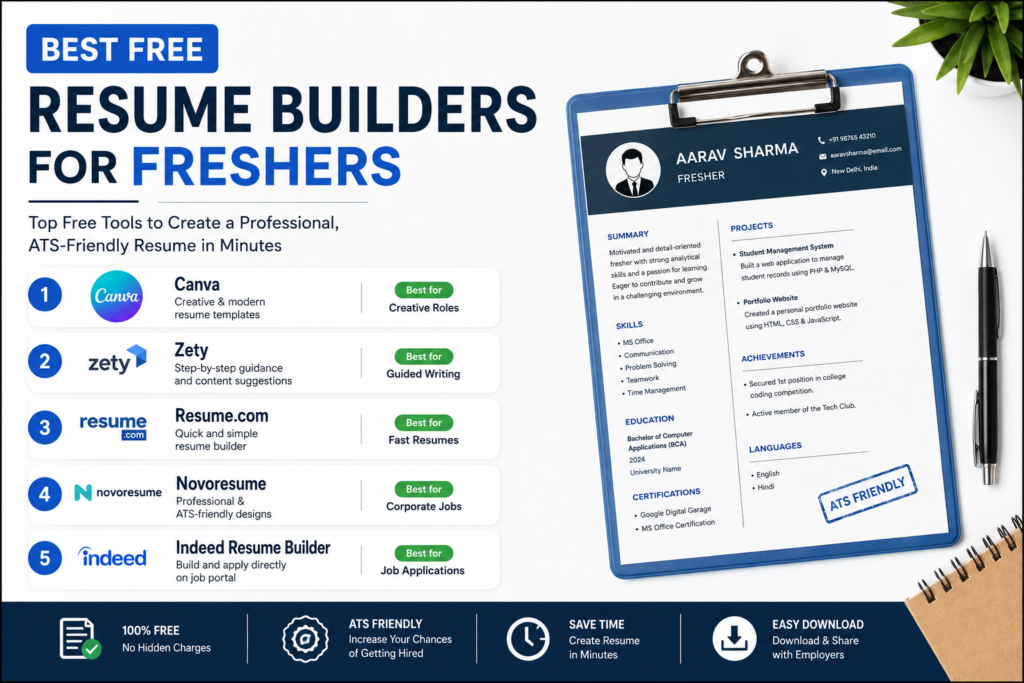
At Knowtify, we believe in making learning and career preparation simple. So here’s a curated list of the best free resume builders for freshers that help you create job-ready resumes quickly.
🚀 Why Freshers Should Use Resume Builders
Instead of struggling with formatting in Word or Google Docs, resume builders simplify everything.
Here’s how they help:
- Ready-made professional templates
- Step-by-step guidance on what to write
- Clean, ATS-friendly formatting
- Saves hours of effort
- Perfect for beginners
💡 Tip: Combine these tools with structured notes and preparation from Knowtify to boost your job readiness.
🏆 Top Free Resume Builders for Freshers
1. Canva Resume Builder
If you want a modern and visually attractive resume, Canva is a great choice.
Why it stands out:
- Drag-and-drop editor
- Creative and clean templates
- Easy customization
Best for: Students applying to internships or creative roles.
2. Zety (Free Version)
Zety is ideal if you don’t know what to write in your resume.
Key benefits:
- Content suggestions for each section
- Guided resume building
- Professional layouts
Best for: Freshers who need writing help.
3. Resume.com
A simple and completely free tool for quick resume creation.
Features:
- Fast resume generation
- Basic templates
- Easy download
Best for: Quick and simple resumes.
4. Novoresume (Free Plan)
Known for its clean and professional designs.
Why use it:
- ATS-friendly templates
- Smart layout structure
- Section-based editing
Best for: Corporate job applications.
5. Indeed Resume Builder
Perfect if you’re applying directly on job portals.
Advantages:
- Easy profile-to-resume conversion
- Direct job applications
- Quick sharing with recruiters
Best for: Fast job applications.
📌 How to Make Your Resume Stand Out (Fresher Tips)
Using a tool is just step one—what you write matters more.
- Keep your resume 1 page only
- Highlight skills, projects, certifications
- Use bullet points instead of paragraphs
- Add keywords from the job description
- Keep formatting clean and simple
💡 Use Knowtify to prepare subject-wise concepts and showcase them as skills or projects in your resume.
Official Resume Builder Links
- Canva Resume Builder
- Zety Resume Builder
- Resume.com Builder
- Novoresume Builder
- Indeed Resume Builder
Create Resume on Canva
🎯 Final Thoughts
You don’t need a perfect background to build a strong resume. With the right free tools and smart preparation, you can create a resume that gets noticed.
Start simple, stay consistent, and keep improving your skills. Your first job is closer than you think.
👉 Want to prepare smarter for jobs and exams? Explore more learning resources on Knowtify.
❓ Frequently Asked Questions (FAQs)
1. Which is the best free resume builder for freshers?
The best free resume builders for freshers include Canva, Zety, Resume.com, Novoresume, and Indeed. These tools offer easy templates, step-by-step guidance, and ATS-friendly formats to help beginners create professional resumes quickly.
2. Can I create a resume for free without experience?
Yes, freshers can create a strong resume even without experience. Focus on your skills, academic projects, certifications, and achievements. Free resume builders guide you on how to present this information effectively.
3. Are free resume builders ATS-friendly?
Many free resume builders provide ATS-friendly templates. Tools like Zety, Novoresume, and Indeed are designed to ensure your resume passes applicant tracking systems used by recruiters.
4. Is Canva resume good for job applications?
Yes, Canva resumes are good for creative and entry-level roles. However, for corporate jobs, it’s better to choose simple and clean templates to ensure ATS compatibility.
5. How long should a fresher’s resume be?
A fresher’s resume should ideally be one page long. Keep it concise, highlight key skills and projects, and avoid unnecessary details.
6. What should a fresher include in a resume?
A fresher should include personal details, career objective, education, skills, projects, certifications, and achievements. These sections help showcase potential even without job experience.
7. Which resume format is best for freshers?
The chronological or combination resume format works best for freshers. It highlights education, skills, and projects in a clear and structured way.
8. Can I download resumes for free from these builders?
Yes, most resume builders offer free downloads, though some may require sign-up or have limited free templates.
9. How can I make my resume stand out as a fresher?
Use a clean design, add relevant keywords, highlight achievements, and keep your content clear and structured. Avoid clutter and focus on showcasing your strengths.
10. Do recruiters prefer simple resumes or creative ones?
Most recruiters prefer simple, clean, and ATS-friendly resumes. Creative resumes are suitable only for design or creative roles.
Knowtify.in provides latest government job updates, schemes information, admit cards, and exam notifications in simple and clear language
ALSO READ NEET 2026 Paper Leak – Latest News, CBI Investigation & New Exam Rules