DigiLocker has become one of the most useful digital services for students in India. From downloading marks memos to storing Aadhaar, driving license, and educational certificates, DigiLocker helps students access important documents online anytime.
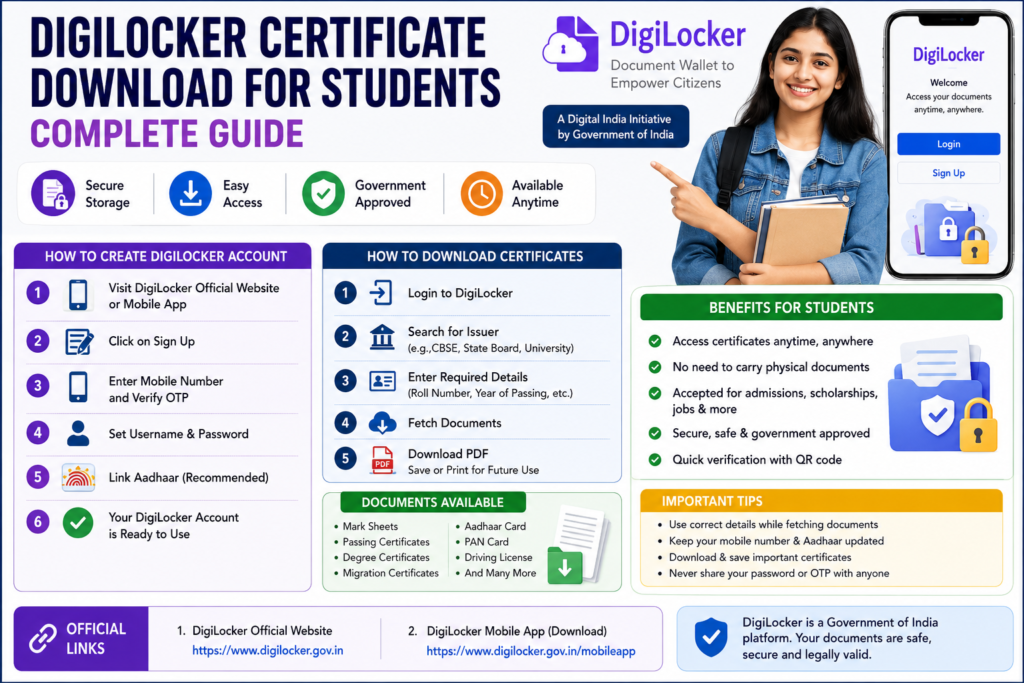
Today, many colleges, universities, scholarship portals, and government recruitment agencies accept DigiLocker certificates as valid digital documents. Students no longer need to carry multiple photocopies everywhere because documents can be accessed directly from mobile phones.
In this article, we explain how students can use DigiLocker, create an account, download certificates, and access educational documents online easily.
What is DigiLocker?
DigiLocker is a digital document storage platform launched by the Government of India under the Digital India initiative.
It allows users to:
- Store digital documents safely
- Download certificates online
- Access government-issued documents
- Share documents digitally
The platform is managed by the Ministry of Electronics and Information Technology (MeitY).
Students can use DigiLocker through:
- Mobile app
- Official website
Why DigiLocker is Important for Students
DigiLocker is becoming essential for students because many institutions now prefer digital verification.
Benefits for Students
- Easy access to certificates
- No need to carry physical copies
- Useful for admissions and counselling
- Secure cloud storage
- Quick document verification
- Accepted by many government departments
Students applying for:
- Scholarships
- College admissions
- Competitive exams
- Government jobs
can use DigiLocker documents during verification.
Documents Available in DigiLocker
Students can access multiple government-issued documents.
Educational Certificates
- CBSE Marks Memo
- SSC Certificate
- Intermediate Marks Memo
- Degree Certificates
- Migration Certificates
Other Important Documents
- Aadhaar Card
- PAN Card
- Driving License
- Vehicle RC
- Insurance Documents
Different boards and universities provide documents through DigiLocker integration.
How to Create DigiLocker Account
Students can create a DigiLocker account easily within a few minutes.
Step-by-Step Registration Process
Step 1: Visit Official Website
Open the DigiLocker official portal or mobile app.
Step 2: Click on Sign Up
Select the registration option.
Step 3: Enter Mobile Number
Provide an active mobile number.
Step 4: Verify OTP
Enter the OTP received on the mobile phone.
Step 5: Set Username & Password
Create login credentials securely.
Step 6: Link Aadhaar
Students can link Aadhaar for faster document access.
After successful registration, the account becomes active.
How to Download Certificates from DigiLocker
Students can download certificates using simple steps.
Step 1: Login to DigiLocker
Use username and password.
Step 2: Search for Issuer
Select:
- CBSE
- State Board
- University
- Government Department
Step 3: Enter Required Details
Students may need:
- Roll number
- Hall ticket number
- Registration number
- Passing year
Step 4: Fetch Documents
The system automatically retrieves certificates.
Step 5: Download PDF
Students can save or print certificates anytime.
How to Download SSC & Intermediate Certificates
Students from Andhra Pradesh and Telangana can also access educational certificates if integrated with DigiLocker.
Required Details
- Hall ticket number
- Year of passing
- Date of birth
After verification, students can download digital certificates instantly.
Official DigiLocker Links
DigiLocker for College Admissions
Many colleges now accept DigiLocker certificates during admissions and counselling.
Useful During
- AP Degree Admissions
- Engineering counselling
- Scholarship verification
- University admissions
Students can directly share digital documents instead of submitting multiple photocopies.
DigiLocker for Scholarships
Scholarship portals often require:
- Income certificate
- Aadhaar
- Marks memos
Students can use DigiLocker documents for faster uploads and verification.
This helps avoid:
- Fake certificates
- Document mismatch issues
- Verification delays
DigiLocker Mobile App Features
The DigiLocker mobile app offers additional convenience.
Features
- Document access anytime
- PDF download
- Cloud backup
- QR code verification
- Secure login
Students can keep all important certificates in one place.
Is DigiLocker Safe?
Yes, DigiLocker is considered safe because it is a government-authorized digital platform.
Security Features
- OTP login
- Aadhaar verification
- Encrypted storage
- Government-managed servers
Students should never share passwords or OTPs with anyone.
How to Upload Documents to DigiLocker
Apart from issued documents, students can upload personal files.
Upload Process
- Login to DigiLocker
- Open uploaded documents section
- Upload PDF or image
- Save documents
These uploaded files can also be accessed anytime.
DigiLocker Document Verification
Most DigiLocker certificates contain:
- QR codes
- Digital signatures
- Official verification systems
This makes digital documents legally valid in many situations.
Common Problems Students Face
Sometimes students may face issues while using DigiLocker.
Common Issues
- OTP not received
- Wrong hall ticket number
- Aadhaar mismatch
- Document not available
- Login problems
Most issues can be solved by checking entered details carefully.
Tips for Students Using DigiLocker
Students should follow these important tips.
Useful Tips
- Use correct mobile number
- Keep Aadhaar updated
- Save login details securely
- Download backup copies
- Verify certificates after downloading
Keeping digital copies ready can help during urgent admissions and applications.
DigiLocker vs Physical Certificates
Digital certificates are becoming more useful because:
- Easy to access
- Hard to lose
- Quick verification
- Accepted online
However, students should still keep original physical certificates safely.
Advantages of DigiLocker During Counselling
During counselling and admissions, DigiLocker helps students:
- Reduce paperwork
- Upload documents quickly
- Access certificates instantly
- Avoid missing documents
This is especially useful during:
- AP EAMCET Counselling
- Degree admissions
- Scholarship verification
Official DigiLocker Services for Students
Students can use DigiLocker for:
- Academic certificates
- Government ID proofs
- Employment verification
- Skill certificates
The platform is expected to become even more important in future digital education systems.
Final Words
DigiLocker is a very useful digital platform for students in India. It helps students store, access, and download important certificates online securely. From educational documents to Aadhaar and scholarship verification, DigiLocker simplifies many student-related processes.
Students preparing for admissions, counselling, scholarships, and government exams should create a DigiLocker account early and keep all important documents ready digitally.
Using DigiLocker can save time, reduce paperwork, and make online applications easier. As digital verification systems continue to grow in India, DigiLocker is becoming an essential tool for every student.
Knowtify.in provides latest government job updates, schemes information, admit cards, and exam notifications in simple and clear language.
also read AP Degree Online Admission 2026 – Registration, Eligibility, Last Date & Complete Process