How to Download Any Government Certificate Online in India (2027)
Gone are the days when you had to visit government offices, stand in long queues, and submit multiple paper applications just to obtain a certificate. Thanks to India’s Digital India initiative, most government certificates can now be downloaded online from official portals in just a few minutes.
Whether you need a Birth Certificate, Income Certificate, Caste Certificate, Domicile Certificate, Aadhaar, PAN Card, Driving Licence, Educational Marksheet, or Ayushman Bharat Card, this guide will help you download them safely and legally.
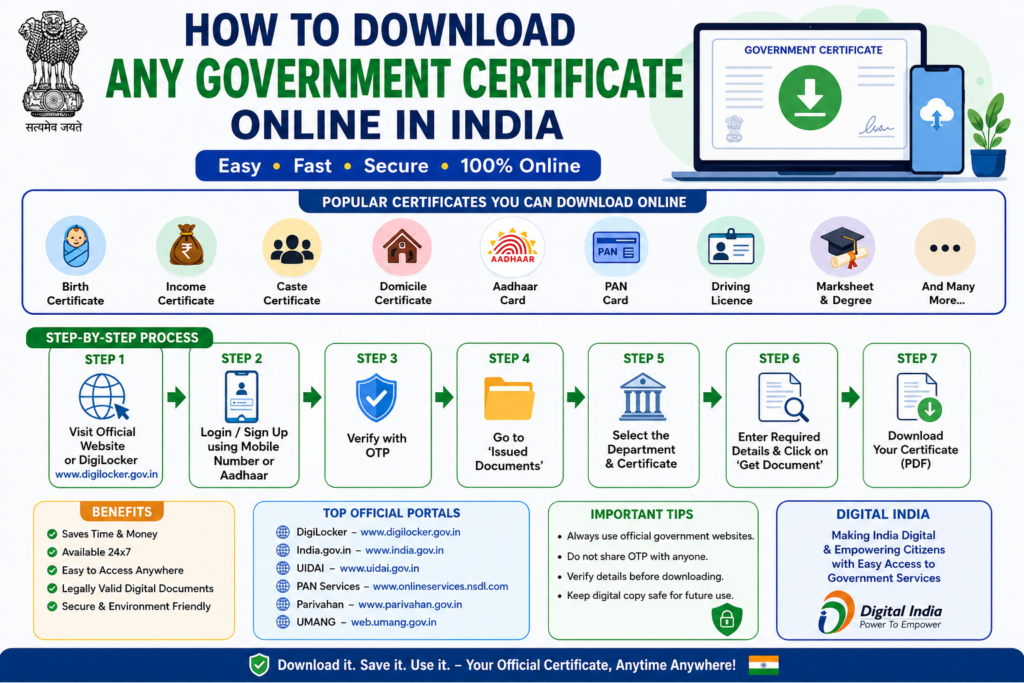
In this article, you’ll learn the complete process, official websites, eligibility, common issues, and security tips for downloading government certificates online.
Why Download Government Certificates Online?
Downloading certificates online offers several advantages:
- Saves time and travel expenses.
- Available 24×7 from anywhere.
- Easy to store digitally.
- Accepted by most government departments.
- Quick access during admissions, job applications, and verification.
- Reduces paperwork and physical document loss.
Types of Government Certificates You Can Download Online
Many certificates and documents are available digitally through official portals.
Identity Documents
- Aadhaar Card
- PAN Card
- Voter ID
- Passport (application status)
- Driving Licence
- Vehicle Registration Certificate (RC)
Educational Documents
- Class 10 Marksheet
- Class 12 Marksheet
- Degree Certificate
- Diploma Certificate
- Migration Certificate
- Transfer Certificate (in many institutions)
Revenue & Residential Certificates
- Income Certificate
- Caste Certificate
- Domicile Certificate
- Residence Certificate
- EWS Certificate
- Non-Creamy Layer Certificate (state-specific)
Health & Welfare Documents
- Ayushman Bharat Card
- Disability Certificate (UDID)
- E-Shram Card
- ABHA Health ID
Civil Registration Documents
- Birth Certificate
- Death Certificate
- Marriage Certificate
Other Documents
- Ration Card
- Pension Certificate
- Land Records (state portals)
- Employment Exchange Registration
- Scholarship Certificates
Methods to Download Government Certificates
There are several official ways to download government documents.
Method 1: DigiLocker
DigiLocker is the most trusted platform for accessing digital government-issued documents.
Benefits include:
- Free to use
- Government-approved
- Secure cloud storage
- Legally valid digital certificates
- QR code verification
How to Download Certificates Using DigiLocker
Step 1
Visit the official DigiLocker website.
Step 2
Sign in using your mobile number or Aadhaar.
Step 3
Verify your account using the OTP.
Step 4
Go to Issued Documents.
Step 5
Choose the department.
Examples:
- CBSE
- UIDAI
- Ministry of Road Transport
- Income Tax Department
- State Governments
Step 6
Enter the required details.
For example:
- Roll Number
- Aadhaar Number
- Registration Number
- Vehicle Number
Step 7
Click Get Document.
Step 8
Your certificate will appear instantly.
Step 9
Download the PDF or save it permanently in DigiLocker.
How to Download Birth Certificate Online
Most states provide online birth certificate services.
General process:
- Visit your state’s Civil Registration portal.
- Select Birth Certificate.
- Enter Registration Number or Birth Details.
- Verify using OTP if required.
- Download the certificate.
How to Download Income Certificate
Income certificates are generally issued through state e-District portals.
Process:
- Visit the state portal.
- Login.
- Open the Certificate section.
- Select Income Certificate.
- Enter Application Number.
- Download the approved certificate.
How to Download Caste Certificate
The process is similar to income certificates.
You usually need:
- Application Number
- Aadhaar verification
- Registered mobile number
How to Download Domicile Certificate
Most states allow citizens to download domicile certificates after approval.
Steps:
- Login to the e-District portal.
- Select Domicile Certificate.
- Enter Application ID.
- Download the certificate.
How to Download Aadhaar Card
If you’ve misplaced your Aadhaar card:
- Visit the official UIDAI portal.
- Select Download Aadhaar.
- Enter your Aadhaar, VID, or Enrolment ID.
- Verify with OTP.
- Download the password-protected PDF.
How to Download PAN Card
If your PAN has already been issued:
- Visit the official PAN services portal.
- Enter PAN details.
- Verify your identity.
- Download the e-PAN PDF.
How to Download Driving Licence
Driving licences are available digitally.
Process:
- Visit the Parivahan portal.
- Login.
- Select Driving Licence Services.
- Download your Digital Driving Licence.
You can also access it through DigiLocker.
How to Download Educational Certificates
Many universities, boards, and institutions issue digital certificates through DigiLocker.
Supported boards include:
- CBSE
- CISCE
- NIOS
- Several State Boards
- Many Universities
Steps:
- Login to DigiLocker.
- Choose your education board.
- Enter Roll Number and Passing Year.
- Download your marksheet or certificate.
How to Download Ayushman Bharat Card
Eligible beneficiaries can:
- Visit the Ayushman Bharat portal.
- Login using Aadhaar or mobile number.
- Search for their record.
- Download the Ayushman Card.
How to Download E-Shram Card
Workers registered under the E-Shram portal can:
- Visit the official website.
- Login with Aadhaar-linked mobile number.
- Verify OTP.
- Download the E-Shram card.
How to Download Land Records
Almost every state has an online land records portal.
You can generally download:
- Record of Rights (RoR)
- Land Ownership Details
- Survey Maps
- Mutation Status
Documents Required
Depending on the certificate, you may need:
- Aadhaar Number
- Registered Mobile Number
- Application Number
- Registration Number
- Roll Number
- Date of Birth
- PAN Number
- Vehicle Number
Benefits of Digital Certificates
Digital certificates are:
- Easy to verify.
- Accepted by government departments.
- Protected with QR codes.
- Environment-friendly.
- Accessible from anywhere.
- Difficult to forge.
Common Problems and Solutions
OTP Not Received
- Check network connectivity.
- Ensure the registered mobile number is active.
- Retry after a few minutes.
Certificate Not Found
- Verify the details entered.
- Wait if the certificate has not yet been issued.
- Contact the issuing department.
Download Failed
- Clear your browser cache.
- Try a different browser or device.
- Check your internet connection.
Wrong Details on Certificate
Request a correction through the issuing authority before downloading again.
Safety Tips
When downloading government certificates:
- Always use official government websites.
- Avoid sharing OTPs with anyone.
- Do not use unofficial apps or websites.
- Verify the website address before entering personal details.
- Keep downloaded PDFs in a secure location.
- Use DigiLocker for long-term storage.
Official Websites
- DigiLocker: https://www.digilocker.gov.in
- National Portal of India: https://www.india.gov.in
- UIDAI (Aadhaar): https://uidai.gov.in
- PAN Services (Protean): https://www.onlineservices.nsdl.com
- Income Tax e-Filing: https://www.incometax.gov.in
- Election Commission of India: https://voters.eci.gov.in
- Parivahan Sewa: https://parivahan.gov.in
- UMANG: https://web.umang.gov.in
- Academic Bank of Credits (ABC): https://www.abc.gov.in
- National Scholarship Portal: https://scholarships.gov.in
Frequently Asked Questions (FAQs)
1. Can I download government certificates online for free?
Yes. Most government certificates can be downloaded free of cost through official portals. Some services may charge a nominal fee for certified copies.
2. Is a DigiLocker certificate legally valid?
Yes. Documents issued through DigiLocker are legally valid under the Information Technology Act, 2000, and are accepted by many government departments and institutions.
3. Can I print downloaded certificates?
Yes. You can print the downloaded PDF. In many cases, the digital version with a QR code is also accepted.
4. What should I do if I lose my original certificate?
If the issuing authority provides digital access, you can download a duplicate copy from the official portal or DigiLocker.
5. Which educational certificates are available in DigiLocker?
Many CBSE, CISCE, NIOS, state board, and university certificates are available, depending on the institution’s integration with DigiLocker.
6. Can I download certificates without Aadhaar?
Some services allow downloads using an application number, roll number, or registration ID. Others require Aadhaar or a mobile OTP for verification.
7. Are digital certificates accepted for government jobs and admissions?
Yes. Digitally issued certificates from official government portals are widely accepted, provided they can be verified.
8. How can I verify whether a digital certificate is genuine?
Most digital certificates include a QR code, digital signature, or verification link that allows employers or institutions to confirm authenticity.
Conclusion
India’s digital governance initiatives have made accessing important certificates faster and more convenient than ever before. By using trusted platforms such as DigiLocker, UMANG, and official state government portals, you can securely download documents like Aadhaar, PAN, birth certificates, educational certificates, income certificates, and many others from the comfort of your home.
Always rely on official websites, protect your personal information, and keep digital copies backed up for future use. With the right portal and a few simple steps, obtaining government certificates online is now a quick and hassle-free process.
ALSO READ https://knowtify.in/government-holidays-calendar-2027-state-wise-pdf/
Knowtify.in provides latest government job updates, schemes information, admit cards, and exam notifications in simple and clear language
Pingback: Documents Required for College Admission 2027 – Complete Checklist for UG, PG & Professional Courses | Knowtify